
The Problem Nobody Warns You About
You try to translate a 300-page PDF with ChatGPT or DeepL. You paste the first block of text — the translation is excellent. Second block — also good. Third block... and now the key character's name is inconsistent. The technical term that appears throughout Chapter 1 shows up with a different word. The formal register of the document has drifted toward something more casual.
This isn't a bug. It's the expected behaviour of tools that were never designed for long documents. Every new request starts from scratch, with no memory of what came before.
This guide explains why it happens and how to translate long PDFs while maintaining coherence from the first page to the last.
Why Generic Tools Fail with Long PDFs
The Context Problem
All language models have a context window — the amount of text they can "see" at once. GPT-4o has roughly 128k tokens (~96,000 words). DeepL has no memory between translation requests at all.
A 300-page document contains approximately 90,000–120,000 words. Even with long-context models, two problems remain:
- Quality degradation at the edges of the window: models are less accurate with content that appears late in their context window — a well-documented phenomenon
- No persistent glossary: there's no mechanism to guarantee that "breach of contract" is always translated the same way and never becomes "violation of agreement" two chapters later
The Stylistic Coherence Problem
A long text has a style. An author uses certain syntactic structures, a particular level of formality, recurring metaphors or phrases. A translation produced in fragmented 5,000-word blocks creates a final text where style fluctuates chapter by chapter.
For novels, this is especially damaging: the author's narrative voice dissolves into the noise of different "versions" the model produces for each fragment.
Types of PDFs That Suffer Most
Novels and Long-Form Non-Fiction
Narrative coherence is everything. Character names, place names, world-specific terminology, and the author's characteristic expressions must be handled consistently from page 1 to page 400.
Technical Manuals
Technical terminology is critical. "Input/output buffer" cannot be translated three different ways in the same manual. Inconsistent terminology in product documentation confuses end users and can create safety issues.
Legal Documents and Contracts
Legal terms carry precise meanings. "Force majeure," "indemnification," and "liquidated damages" have specific implications that must be handled consistently throughout an 80-page contract. Inconsistent translation creates genuine legal ambiguity.
Corporate Reports and Annual Reviews
Brand identity depends on language. A company with a specific communication tone cannot afford its 150-page annual report to have three different registers depending on which section was translated first.
How to Translate a Long PDF Correctly
Step 1: Text Extraction
First, extract the text from the PDF in an editable format. Two situations:
Native PDF (digitally generated): you can copy text directly or use extraction tools. Quality is high.
Scanned PDF (image-based): you need OCR (optical character recognition) before translating. Tools like Adobe Acrobat, ABBYY FineReader, or even Google Drive can perform reliable OCR.
Step 2: Choose the Right Tool
For PDFs over 20–30 pages, you need a tool that:
- Processes the entire document before translating, not fragment by fragment
- Builds an internal glossary of key terms and proper nouns
- Maintains the source style throughout the full translation
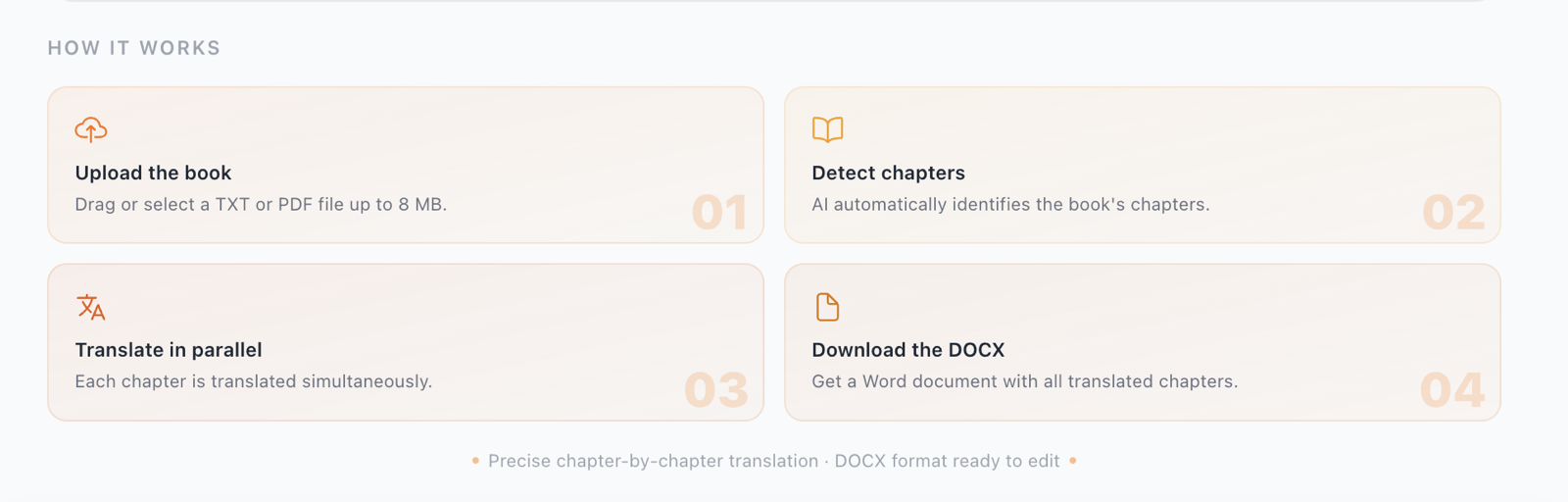
Specialised long-document translation tools work with a multi-agent architecture: they first analyse the full document, extract key terminology and stylistic fingerprints, then translate each section with that global context always available.
Step 3: Define Your Glossary Before Translating
If there are terms that should not be translated (product names, brand terms, proprietary technical terms) or that must always be translated in a specific way, define them explicitly before launching the translation.
Example for a software manual:
- "Dashboard" → keep in English, do not translate
- "User interface" → always "interfaz de usuario" (never "pantalla gráfica")
- "Repository" → always "repositorio" (never "almacén" or "depósito")
Step 4: Translate by Chapters with Global Context
The difference between a poor and a good long-PDF translation is whether the tool translates in isolated fragments or maintains context between sections.
The correct process:
- The system reads the full PDF
- Identifies key characters, terminology, dominant style
- Generates a "translation profile" for the document
- Translates chapter by chapter using that profile as a constant reference
Step 5: Review the Output
Even with the best tool, human review is necessary to:
- Verify proper nouns are handled consistently
- Confirm tone is consistent with the source document
- Catch any omissions in complex or multi-clause paragraphs
- Adjust register in sections where the author deliberately shifts tone
Tool Comparison for Long PDF Translation
| Tool | Long Documents | Persistent Glossary | Word Export | Pricing |
|---|---|---|---|---|
| DeepL Pro | Up to ~50 pages well | No | Yes | Monthly subscription |
| ChatGPT | Isolated fragments | No | No | Usage-based |
| Google Translate | Isolated fragments | No | No | Free |
| Nomos | Up to 200 pages | Yes (automatic) | Yes | Per credit |
Language Pair Quality
Translation quality varies significantly by language pair. For pairs involving English, the highest-quality results are typically:
High-quality pairs (English as source or target):
- English ↔ Spanish
- English ↔ French
- English ↔ German
- English ↔ Italian
- English ↔ Portuguese
Medium-quality pairs (greater structural distance):
- English ↔ Japanese
- English ↔ Chinese (Mandarin)
- English ↔ Arabic
For these latter pairs, human review is particularly important for literary or legal texts where nuance is critical.
Conclusion
Translating a long PDF with AI is entirely viable in 2026 — but it requires a tool designed for complete documents, not isolated text fragments. The key factors are: processing the entire document before translating, maintaining an internal glossary, and preserving stylistic consistency throughout.
If your PDF runs over 30 pages, investing in a specialised tool will save you far more time in manual editing than the tool costs. The hours you'd spend homogenising terminology and tone across a 200-page document are simply not worth the false economy of using a free general-purpose tool.